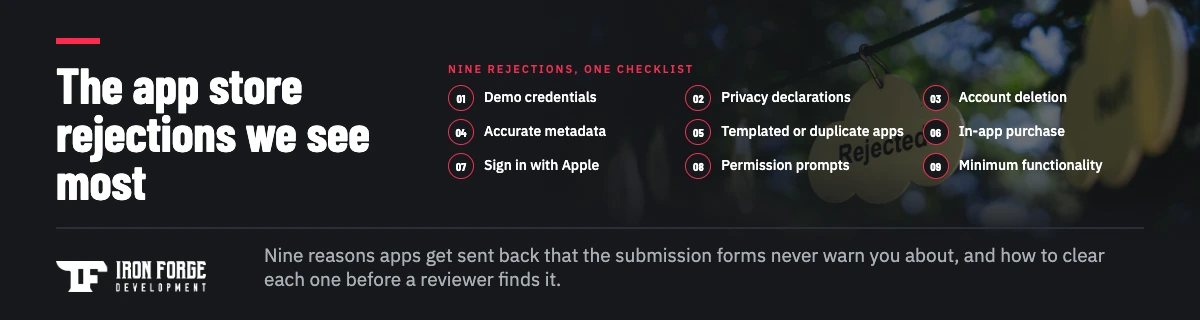
Most of the App Store and Google Play rejections our clients run into have nothing to do with code quality. They come from a short list of things the submission forms never ask about directly: a reviewer who can't log in, a privacy declaration that doesn't match what the app actually does, an account that can't be deleted from inside the app, screenshots that promise a feature the build doesn't have. Each one costs a resubmission, and a resubmission costs days you planned to spend on launch. Below are the nine rejections we see most often across the apps we build and maintain, why each one happens, and how to clear it before a reviewer finds it. At the end, how we handle submissions and rejections for clients so founders stop doing this part themselves.
One note on sources: Apple's App Review Guidelines and Google Play's developer policies change several times a year, and the guideline numbers below reflect them as we read them today. Check the current text before you submit.
1. Missing or broken demo credentials
If your app has a login, the reviewer needs an account that works on the first try. Apple's guideline 2.1 (App Completeness) is explicit that a demo account is required for any app that needs one, and Google reviewers expect the same through the Play Console's app access section. Nobody forgets to provide credentials. The account was created on staging and the build points at production, or it expired, or two-factor authentication fires a code to a phone the reviewer doesn't have.
Create a dedicated reviewer account on the same environment as the submitted build, turn off multi-factor for it, seed it with realistic data so every screen has something to show, and test it on a clean device the morning you submit. Put the credentials in the review notes, and describe anything a reviewer wouldn't guess, like a feature that only appears after a specific action.
2. Privacy policy gaps and data-use declarations that don't match the app
Both stores now ask you to declare what data the app collects and why. Apple calls it the App Privacy section (the "nutrition label"), Google calls it the Data safety form. Reviewers compare those declarations against what the binary does, and the mismatch is what gets you. The classic version: an analytics or crash reporting SDK collects device identifiers, the developer didn't know, and the form says the app collects nothing. Apple's guideline 5.1.1 covers the privacy policy and data collection rules, and since 2024 Apple has also required a privacy manifest for certain third party SDKs, which is a separate way the same mismatch surfaces.
Before you fill in either form, inventory every SDK in the build and what it collects. Your privacy policy has to be reachable from the store listing and from inside the app, and it has to describe the same collection the forms declare. If the app handles anything sensitive, health data, financial data, precise location, the policy needs to say so specifically, not generically.
3. No way to delete an account inside the app
If users can create an account in your app, they have to be able to delete it in your app. Apple added this under guideline 5.1.1(v) in 2022, and Google Play's account deletion requirement followed in 2024. "Email us to delete your account" doesn't satisfy either. Deactivation doesn't either. The flow has to start inside the app and actually remove the account and its associated data, with the usual allowances for records you're legally required to keep.
This one blindsides teams because the sign-up flow gets built in week one and nobody thinks about the exit until the rejection arrives. Build deletion into the account settings from the start, make the confirmation clear, and if deletion takes time on the backend, tell the user what happens next. Google also asks for a web link where users can request deletion without reinstalling the app.
4. Misleading metadata
Apple's guideline 2.3 (Accurate Metadata) and Google's metadata policy both say the listing has to represent the app as submitted. Screenshots that show a redesigned interface the build doesn't have yet. A description that advertises a feature behind a "coming soon" placeholder. A title stuffed with keywords. Screenshots lifted from a different platform. Reviewers look at the listing and the app side by side, and anything that doesn't line up gets flagged.
Capture screenshots from the exact build you're submitting, on the device sizes the store requires. Write the description from what the app does today, and move future features to a release-notes plan instead of the listing. If you're launching an MVP, the listing should be honest about the MVP; a focused description converts better than an inflated one anyway.
5. Duplicate or templated apps
Apple's guideline 4.3 (Spam) rejects apps that duplicate other apps, including your own, and apps generated from a template with content swapped in. Google's repetitive content policy does the same. This hits agencies that ship a white-labeled app per customer, and it hits founders who built on a template or no-code tool whose output looks like hundreds of other listings.
If you need separate apps for separate customers, Apple's answer is that each should offer a unique, customized experience, or that the customer publishes it under their own developer account. If the app came from a template or an AI-generated starting point, the fix is usually to make it genuinely yours in function and design before submitting, which is a product decision, not a packaging one. Our guide to what to do with an AI-built MVP covers that decision.
6. Selling digital goods without in-app purchase
Guideline 3.1.1 is the rule everyone has heard about and still gets wrong. If your app sells digital content, features, or subscriptions that are consumed inside the app, Apple requires its in-app purchase system for the sale. Google Play's billing policy has the same shape. The common mistakes: a subscription paywall that links out to your website, a "buy credits" screen using a card processor, or a plan comparison that mentions a cheaper price elsewhere.
Physical goods and real-world services are the main exception, which is why you can pay for a ride or a meal with a card in an app. Know which side of that line your product sits on before you design the paywall, because changing it after a rejection means rebuilding the purchase flow and the backend that validates it. The rules around external purchase links have shifted by region in the last two years, so this is one to confirm against current policy for every market you ship to.
7. Third-party sign-in without an equivalent privacy option
If your app offers "Continue with Google" or "Continue with Facebook" to create the primary account, Apple's guideline 4.8 (Login Services) requires you to also offer a login option that limits data collection to name and email, lets users keep their email private, and doesn't track them for advertising without consent. Sign in with Apple meets those conditions, which is why the practical fix is almost always to add it. The rule doesn't apply if your app only uses your own email-and-password system, or to enterprise and education apps that require an existing organization account, but it applies the moment a social login button creates the main account.
Two implementation details cause a second rejection after the first fix. Apple returns the user's name only on the first authorization, so persist it then. And users who choose "Hide My Email" get a relay address; your backend has to accept it and your transactional email domain has to be registered with Apple's relay service, or sign-up succeeds and the welcome email never arrives.
8. Permission prompts that don't explain themselves
Every iOS permission request (camera, photos, location, contacts, microphone, Bluetooth) needs a purpose string that explains what the app does with that access, and Apple rejects vague ones under 5.1.1. "This app needs camera access" is vague. "We use the camera to scan the barcode on your prescription bottle" is specific. Google Play adds a permissions declaration for sensitive permissions like SMS, call logs, and background location, and rejects apps that request access they can't justify.
Audit every permission the app requests, cut the ones you don't use (SDKs often request more than you expect), and write purpose strings that describe the user-facing feature. Ask for permissions at the moment the feature needs them, never all at once on first launch.
9. Not enough app to review
Three related rejections land under Apple's guidelines 4.2 (Minimum Functionality) and 2.1 (Performance): the app doesn't do enough to justify being an app rather than a website, the app crashes or shows placeholder content during review, or the reviewer can't find the features the description promises. The last one is the quiet killer. The feature exists, it just lives behind a gesture, a settings toggle, or a state the reviewer never reaches.
Test the submitted build on a physical device, on a fresh install, over cellular, as a brand-new user. Then write review notes that walk a stranger to every feature named in the description. If a feature requires a particular account state, a sample order, a paired device, or a specific region, say so and provide a way to reach it. Reviewers are reasonable when you give them a map; they're strict when you make them hunt or it is not immediately apparent how it works.
Why these keep catching good teams
None of the nine is a coding problem, which is exactly why they slip past capable developers. They live in the gap between "the app works" and "the app is submittable": review notes, store forms, privacy inventories, platform rules that shift twice a year. A team shipping its first app meets each rule the hard way, one rejection at a time. A team that submits every month has already met all of them.
The cost compounds. Each rejection restarts review, pushes the launch date, and pulls a developer off the roadmap to chase a policy question. For a founder running a launch campaign against a date, a week of resubmissions is the difference between a coordinated launch and a quiet one.
How we handle submissions for clients
Our answer is to take the whole thing off the founder's desk. For products we build, and for products that join our development membership, app store submission is white glove: we prepare the listing, write the review notes, set up the reviewer accounts, complete the privacy and data safety declarations from an SDK inventory, run the pre-submission checklist against the current guidelines, submit, and watch the review. If a rejection comes back, we read it, fix it or argue it, and resubmit, and we keep the client informed rather than forwarding the rejection email and asking what they'd like to do.
The membership version matters because submissions never stop. Every OS release, every SDK update, every new feature means another trip through review, and the rules will have moved since last time. A team that lives in the review process keeps your app in the stores without the founder learning a new policy each quarter. The membership covers the rest of a live product's needs too, monitoring, security updates, QA, and steady feature work, which is why we shaped it as a monthly engagement instead of a per-submission fee. Our FAQ on handling app store submissions on an ongoing basis covers the mechanics, and what a membership can include covers the rest of the menu.
If you're still ahead of your first submission, the same checklist belongs in your build plan from day one. Account deletion, Sign in with Apple, purpose strings, and the purchase model are all cheaper to design in than to retrofit after a rejection, and they're the kind of thing a proper scoping phase puts in writing before anyone writes code. Our guide to mobile app development for startups covers that planning stage.
Tired of learning App Store policy one rejection at a time? Tell us what you're shipping and we'll handle the submission end to end, as part of a membership built around what your product actually needs. If the app isn't built yet, a fixed-price Discovery puts the store requirements into the scope before the first line of code. Or get in touch and ask us about your last rejection.
Written by the team at Iron Forge Development, a U.S. based software commercialization firm that has helped launch 100+ products from idea to market.