If your software is live, needs steady care, and doesn't generate enough work to keep a full-time developer busy, a development membership is usually the right answer. A membership is a fixed monthly engagement with a team that already knows your codebase, scaled to what your product actually needs this quarter. The common alternative, a big agency retainer, sells you a block of hours sized for the agency's convenience. The difference sounds small on paper. Over a year of invoices it isn't.
This guide covers what a membership should include, where retainers go wrong, what ongoing support ought to cost, and how to tell whether you need any of it.
What a development membership actually is
A membership is ongoing access to a development team on a recurring basis, priced as a predictable monthly amount instead of a per-project quote or an open hourly meter. The team carries context between months. They know your architecture, your deploy process, and the workaround from last spring, so small requests stay small. You're paying to keep a capable team attached to your product, at a fraction of what employing that range of skills would cost.
The model exists because launched software occupies an awkward middle. It needs real attention, more than "call someone when it breaks," and usually much less than a full-time hire. Memberships are shaped for that middle.
What a membership should cover
The right contents depend on your product, and that's the point: a good membership is assembled around your needs rather than sold off a rate card. The menu we build from looks like this:
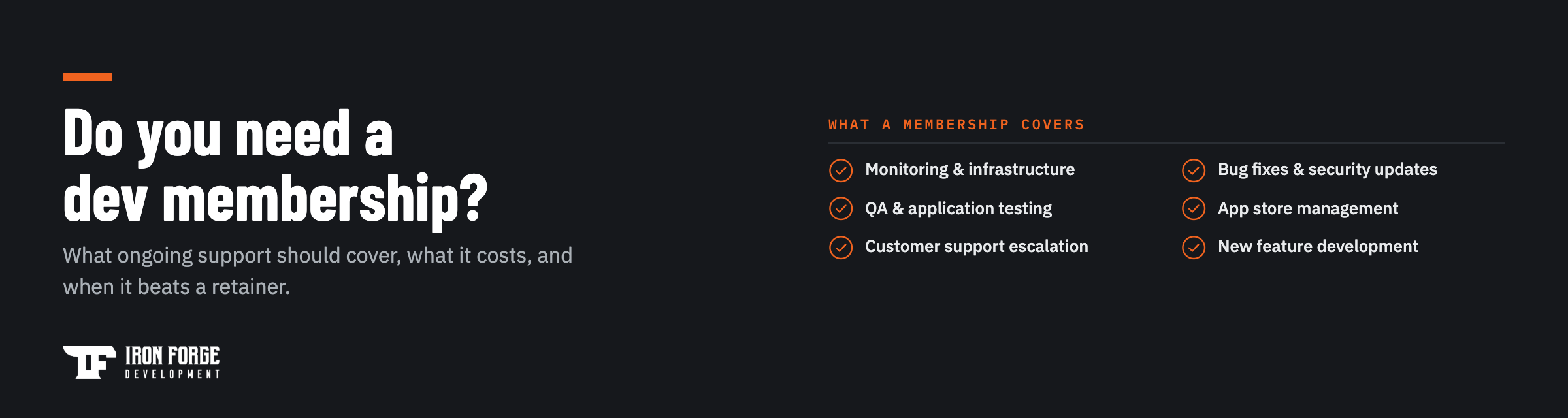
- Monitoring and infrastructure. Someone watching your servers, AWS bills, and uptime before a customer emails you about it.
- Bug fixes and security updates. Dependencies age, frameworks patch vulnerabilities, and browsers change. This work never announces itself. It just accrues.
- QA and application testing. Regular checks that the flows your revenue depends on still work after every change.
- App store management. For mobile products, submissions, updates, and the Apple and Google review process, which run on their schedule and never yours.
- Customer support escalation. A technical team behind your support inbox for the tickets that turn out to be bugs.
- New feature development. Steady product improvement, month over month, without re-scoping a project every time.
Our FAQ on what a membership can include goes deeper on the menu. The mix should change as your product does. A quiet, stable tool might carry monitoring, updates, and a small fix budget. A growing product might carry a steady feature cadence on top.
Where big retainers go wrong
Retainers price capacity. You commit to a monthly block of hours, and the hours exist whether or not useful work fills them. Quiet months still cost full price, and unused hours usually expire. Busy months blow past the block and bill overages. Either way the risk sits with you.
The incentives underneath are the real problem. A firm selling hours does better when work takes longer, and a minimum sized for enterprise clients quietly prices out everyone else. Plenty of businesses pay for a retainer for a year, then audit it and find they bought availability, a standing option on someone's calendar, while the actual shipped work would have fit in a month.
A membership prices outcomes instead: keep the product healthy, keep the roadmap moving, at a monthly number that matches the product's actual appetite. When the appetite changes, the membership changes.
The break-fix trap
The cheapest-looking option is having no arrangement at all: run the product, and call somebody when it breaks. Businesses that choose it are usually pricing the quiet months and ignoring the loud ones.
Break-fix has three costs that never appear on a quote. First, response time. When something fails, you're finding a developer, negotiating availability, and paying rush pricing while the product is down and customers notice. Second, context. Whoever answers the call has never seen your codebase, so you're paying them to learn it before you're paying them to fix anything, every single time. Third, direction. Break-fix work only ever restores yesterday. Nobody in that arrangement is watching dependencies age, planning upgrades, or noticing that a small change now would prevent a large failure later.
The pattern has a familiar ending. Products maintained by emergency drift until they qualify for a rescue, and rescue engagements cost more than the maintenance that would have prevented them. Paying for care monthly is how you avoid paying for surgery annually.
Membership or a hire
The other route is hiring a developer. Sometimes that's right, and we wrote a full cost comparison of in-house teams versus partners for exactly this decision. The short version: one hire buys you one person's skills, on payroll during quiet months, and a single point of failure when they leave. A membership buys slices of several skills (engineering, design, QA, infrastructure) that a maintained product actually consumes, with continuity that doesn't resign.
The crossover comes when your product generates enough sustained work to fill a full-time role, week after week. Below that line, payroll is the expensive way to feel safe.
What ongoing support should cost
The honest anchor is the industry rule of thumb we use in planning: expect around 15-20% of your original build cost per year to keep software maintained, patched, and improving. A product that cost $60,000 to build carries roughly $9,000 to $12,000 a year of real upkeep, whoever performs it. Budgets that ignore this number don't eliminate the work. They defer it, and deferred maintenance compounds until it resurfaces with a bigger invoice attached, sometimes as a full rescue.
A membership should land inside that band and hold a predictable monthly shape, so the number in January still looks like the number in October. Our cost guide covers the build side of the math if you're still ahead of launch.
Signs you need one
You probably need a membership if more than one of these sounds familiar:
- Your product is live and nobody on payroll can change it.
- Small fixes wait weeks because every change means re-hiring someone.
- Your app hasn't shipped a store update since launch, and the OS has moved twice.
- Security updates happen when something breaks, never before.
- You have a feature list growing faster than your capacity to ship it.
- The developer who built it has moved on, and their knowledge left with them.
That last one matters most. Continuity is the quiet product a membership sells. A team that stays attached to your codebase turns "who even knows how this works?" from an emergency into a non-event. If several of the signs above hit at once, the useful move is a codebase review before anything else, since a team can't responsibly maintain software it hasn't read, and you shouldn't buy maintenance on a product whose condition nobody has assessed.
What to ask before you sign
Whoever you evaluate, put four questions in writing:
- Who owns the code? Everything produced under the membership should be yours, in writing. The only good answer is you.
- Which named people work on my product? Continuity is the value. A rotating cast of whoever's free is a retainer wearing a membership's clothes.
- What exactly is included at my tier? Get the list. "We'll handle it" needs edges, or the first out-of-scope invoice will draw them for you.
- How does this scale? Roadmaps speed up and slow down. The membership should move with yours without a renegotiation each time.
A partner confident in their model answers all four without flinching, and the answers tell you more than any portfolio page. Hesitation on ownership is disqualifying. Vagueness on scope is a preview of your billing disputes.
One more filter: a membership is worth most when the team behind it can do more than patch. Fixing a bug, restyling a screen, and scoping a new feature are different skills, and you want them under one roof so the product improves instead of merely surviving. Ask what the team shipped for membership clients last quarter. Maintenance-only shops keep products alive. A commercialization team keeps them competitive, and the monthly cost of the two is often the same.
Is your product live with nobody minding it? Tell us what you're running and we'll shape a membership around what it actually needs, starting with a fixed-price Discovery if the codebase needs a proper look first. Or get in touch and ask us anything.
Written by the team at Iron Forge Development, a U.S.-based software commercialization firm that has helped launch 100+ products from idea to market.