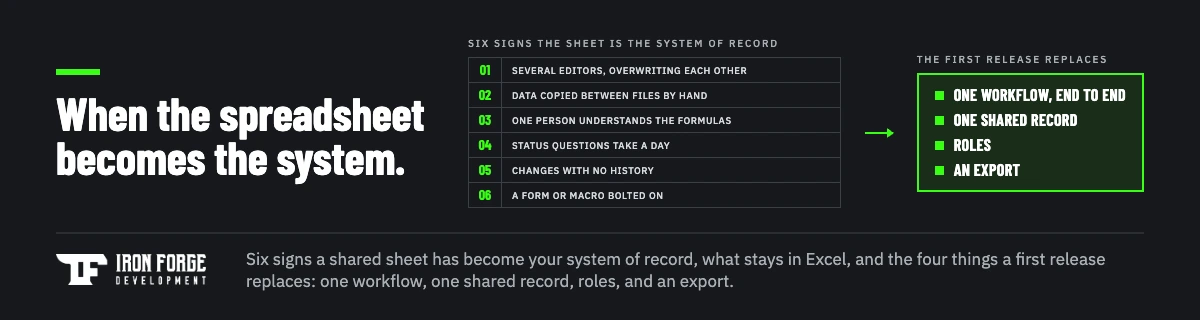
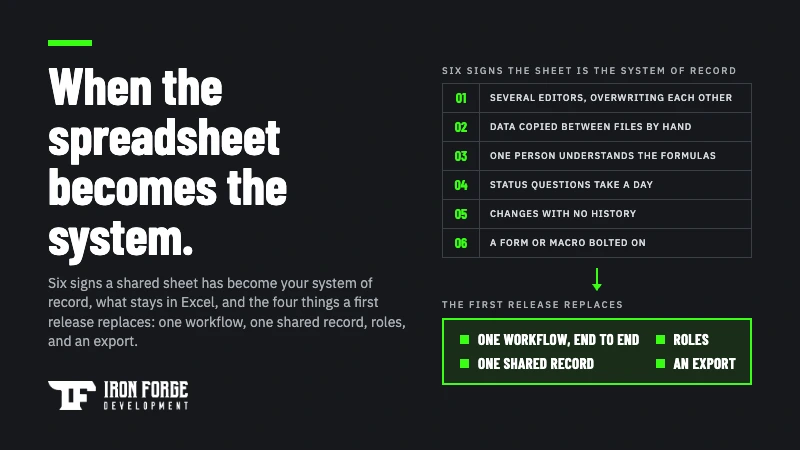
Replace a spreadsheet with custom software when it has become one of the main systems of record for a workflow that several people run every day, and keep the spreadsheet for everything else. The signals are consistent: more than two or three regular editors, data copied between files by hand, formulas only one person understands, and status questions that take someone a day to answer. When those are true, the spreadsheet is doing the job of a database and a workflow tool at the same time, and it's doing both badly. The fix is usually smaller than owners expect. A first release replaces one workflow, one shared record, a few roles, and an export, and leaves analysis and one person trackers right where they are. This guide covers how to tell when you've crossed the line, what to keep in Excel or Google Sheets, how to price the cost of staying without inventing statistics, what the first version should contain, how the data gets moved, and the cases where you shouldn't build anything at all.
When a spreadsheet becomes the system of record
Spreadsheets are good at the thing they were built for: one person, one problem, a grid of numbers, and a result. Nearly every business runs on a few of them, and should. The trouble starts when a sheet that began as one person's tracker quietly becomes the place the whole company looks to find out what's true. Nobody decides this. It happens one shared link at a time.
The signs that it has happened:
- Several people edit it, and they overwrite each other. Version names like "schedule_v7_FINAL_jen.xlsx" are a symptom. So is the Monday argument about whose copy is right.
- Data moves between files by copy and paste. The job list feeds the invoice sheet, which feeds the report sheet, and a person is the integration. Every hop is a chance for a typo and a day of delay.
- One person understands the formulas. If that person is on vacation, the sheet is read only. If they leave, it's a liability.
- Status questions take a day. "Where are we on the Henderson order?" should be a glance. If the answer requires opening three files and asking two people, the information exists but the system doesn't.
- History is lost. A cell gets changed and nobody knows what it said before, who changed it, or why. For anything involving money, customers, or compliance, that's a real exposure.
- The sheet has a login. Someone built a front end form, a macro, or a script to make the spreadsheet behave like an application. That's a system of record wearing a spreadsheet costume.
Three or more of these, for a workflow that matters to revenue or operations, is the threshold. One or two means the spreadsheet is strained but working, and the right answer may be a better spreadsheet.
What to keep in the spreadsheet
Custom software replaces one job spreadsheets were never meant to hold, and leaves the rest alone. After a build, these stay in Excel or Sheets, and should:
- Analysis. Pivoting, charting, what if models, and the pricing scenario your CFO rebuilds every quarter. The new system should feed these with a clean export, which is often the single most valuable feature in a first release.
- One person trackers. A list only you maintain and only you read doesn't need roles, permissions, or an audit trail.
- Short lived projects. A six week event, a one time migration checklist, a budget for a single purchase.
- Anything still changing shape. If the columns change every month because the process is still being worked out, keep it in a sheet until it settles. Software built around a process that hasn't stabilized gets rebuilt.
A useful rule: the system of record moves into software, and the thinking about it stays in spreadsheets.
What it costs to stay
Owners usually tolerate a spreadsheet system because its cost never shows up on an invoice. You can make it show up, using your own numbers and nothing else. Count four things for one month:
- Hours of data entry and reentry. Who copies what between files, how often, and how long it takes. Multiply by their loaded cost.
- Hours answering status questions. The time spent finding out what's true, by the people who get asked.
- Errors you caught. The order shipped twice, the invoice with last month's price, the schedule that double booked a crew. Note what each one cost to fix. Then assume there were some you didn't catch.
- Decisions you couldn't make. The report you wanted and didn't build because it would take a week. This one has no number, so describe it instead.
Add it up and annualize it. That's your cost of staying, and it's the number to put next to a build estimate. Resist the temptation to borrow an industry statistic about spreadsheet error rates; your own month of counting is more persuasive to you, to a partner, and to whoever approves the budget, because it's about your business.
When you shouldn't build yet
Sometimes the honest answer is a better spreadsheet or a configured product, and a partner who builds custom software should be willing to say so.
A configured off the shelf tool is the right call when the workflow is a commodity: a CRM for a standard sales process, a project tracker for a standard project, inventory for a standard warehouse. If you can describe what you need by naming a product category, try the product first. Our guide to choosing between custom software and off the shelf covers that decision in full, including the test that separates commodity workflows from the ones worth building for.
A better spreadsheet is the right call when the problem is a single sheet that's grown messy but has one or two editors: a cleanup, a locked template, a data validation pass, and a shared drive with sensible permissions fixes more than people expect, for an afternoon's effort.
Build when the workflow is specific to how you operate, the signals above have been true for months, and the configured product you tried needed as many workarounds as the spreadsheet did. That combination is common, and it's the point where custom software is the cheaper option over any reasonable horizon.
What the first release should replace
The first version shouldn't replace all your spreadsheets. It should replace the one that hurts most, and only the parts of it that hurt. Four things belong in it:
- One workflow, end to end. A job comes in, gets scheduled, gets done, gets invoiced. Or a lead comes in, gets qualified, gets quoted. One path a real user completes without touching a spreadsheet.
- One shared record. The thing everyone was keeping their own copy of: the customer, the job, the order, the asset. Stored once, in a data model built to carry the rest of the product later.
- Roles. Who can see what and change what. This is the feature a spreadsheet can't offer and the one that stops the overwriting.
- An export. A clean CSV of the record, on demand, so analysis keeps happening in the spreadsheets that are good at it.
What waits: reporting beyond a list and an export, the second workflow, notifications, the mobile version, and every feature justified by "while we're at it." Those are Phase 2 decisions, and they get better when they're made after real use. Our guide to phasing a software build covers how to draw that line and what decides the go for Phase 2.
How the data gets moved
Migration is the part of a spreadsheet replacement that gets underestimated most, because the data looks simple until you try to load it. In practice it has three steps, and each needs its own line in the scope.
First, cleaning. Years of free text entry means "Acme Corp," "ACME," and "Acme Corporation" are three customers. Dates in four formats. Empty cells that meant "unknown" and empty cells that meant "zero." Someone has to decide the rules, and the people who know the data have to be in that conversation.
Second, mapping. Every column goes to a field in the new system or to the "not migrating" list. The second list is longer than people expect, and that's healthy; a lot of spreadsheet columns exist because someone needed them once.
Third, the parallel run. For a defined period, usually a few weeks, the spreadsheet and the new system both get updated, and someone checks that they agree. It feels like double work, because it is. It's also the only reliable way to find the rule nobody wrote down. When the two match for a full cycle, the spreadsheet goes read only, and it stays available as a historical reference. Our FAQ on whether you lose data when migrating off a platform describes the same validation step from a different starting point.
What it costs to build
A focused first version of a custom product typically runs $25,000 to $75,000, per our custom software cost guide, and a spreadsheet replacement scoped the way this guide describes, one workflow, one record, roles, and an export, usually sits toward the lower part of that range because the requirements are already proven. The spreadsheet is the most accurate requirements document you'll ever have. Owning the software afterward runs roughly 15 to 20 percent of the build cost per year. Set that number against the cost of staying you counted above, over three years, and the decision usually makes itself one way or the other.
How Discovery maps the workflow
The hardest part of replacing a spreadsheet is describing what the spreadsheet actually does, because much of it lives in habits rather than cells. That's the job of a discovery phase. Over two to three weeks we sit with the people who run the sheet, watch how the work really happens, find the rules that were never written down, and sort every requested feature into the first release or later. You leave with a requirements document, API recommendations for the accounting or scheduling tools the build has to connect to, development considerations, line item pricing, and a timeline, whether you build with us or anyone else. We wrote up what a discovery phase costs and what you get for it separately.
If you want a head start, our guide to writing a software requirements document shows the format. For a spreadsheet replacement, the best preparation is simpler: export the sheet, write down who touches it and when, and list the three questions you most often can't answer from it. Nonprofits face a version of this problem with donor and program data that's worth its own page; our guide to custom software for nonprofits covers that case.
Running a core workflow in a spreadsheet that's outgrown its job? Our Discovery package maps the workflow, tells you honestly whether software is warranted or a better spreadsheet would do, and prices the first release line by line. Book a free strategy call and bring the sheet.
Written by the team at Iron Forge Development, a U.S. based software commercialization firm that has helped launch 100+ products from idea to market.